REDESIGNING STUDYCLUES
A Conversational AI Assistant for Course-Grounded Learning
As Lead Product Designer at LearningClues, I led the redesign of an AI-powered study companion called StudyClues alongside an evolving roadmap of new AI features.

THE IMPACT
17K+
Users
57%
Avg Retention
250
Live Courses
THE PROBLEM
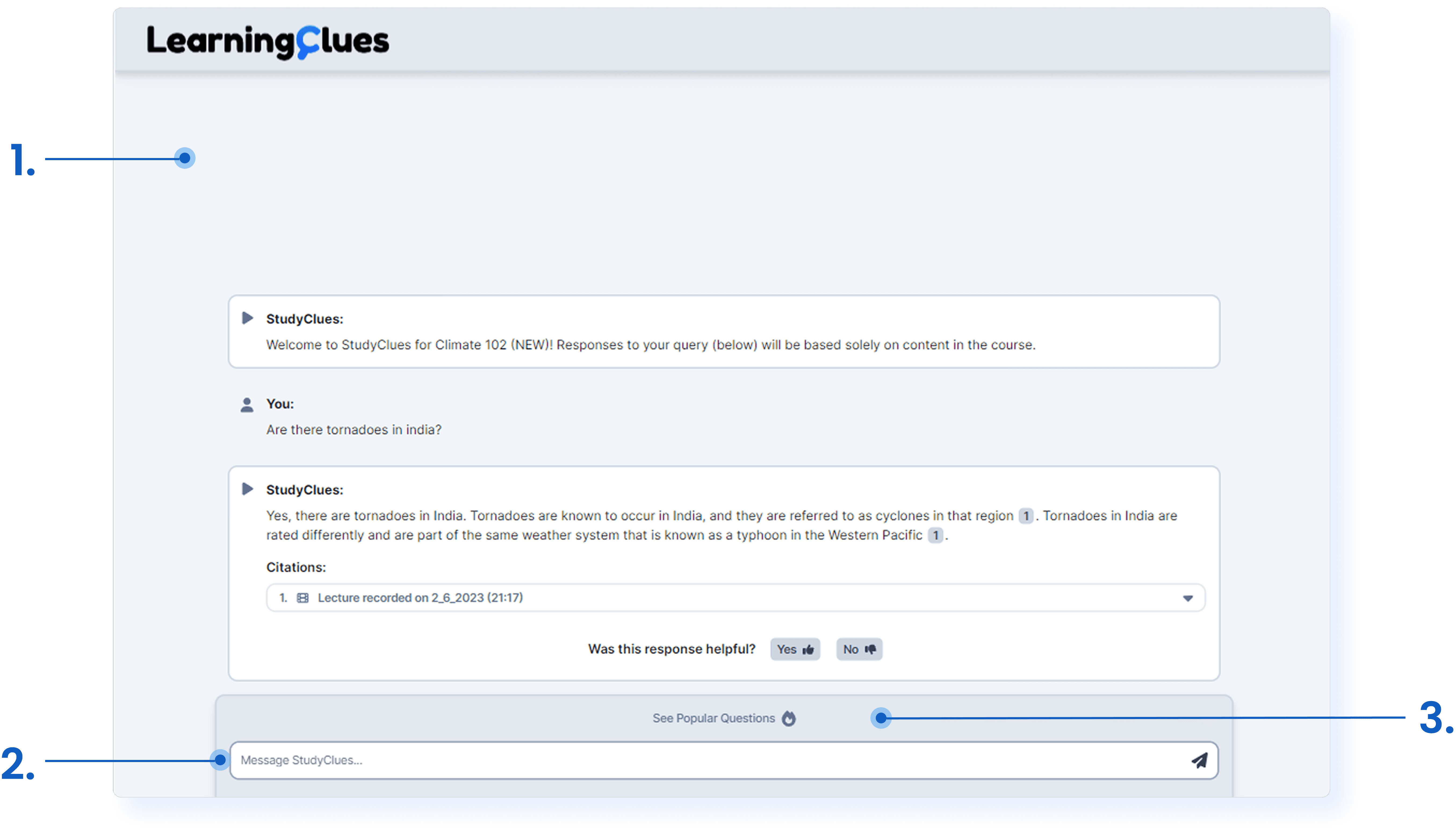
The AI Chat Assistant is unable to scale with its growing feature set as students find it difficult to navigate and discover what the system can do.
Missing a conversation history panel to surface past conversations
No home for AI modes to surface new AI capabilities in chat
Old AI Chat
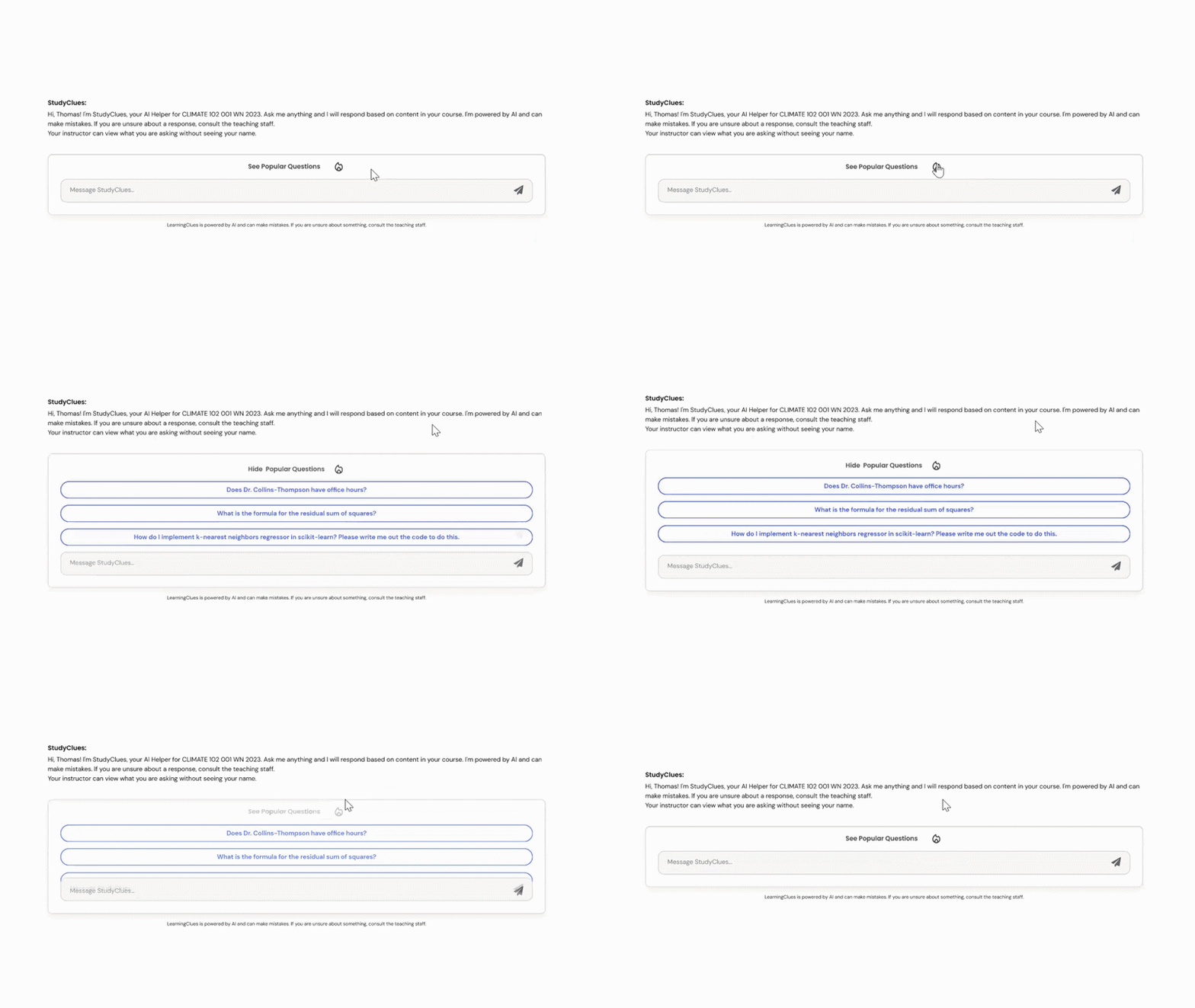
Popular questions are hidden behind an overlay, failing to capture user attention to help them get started
THE GOAL
How might we redesign StudyClues so that it is…
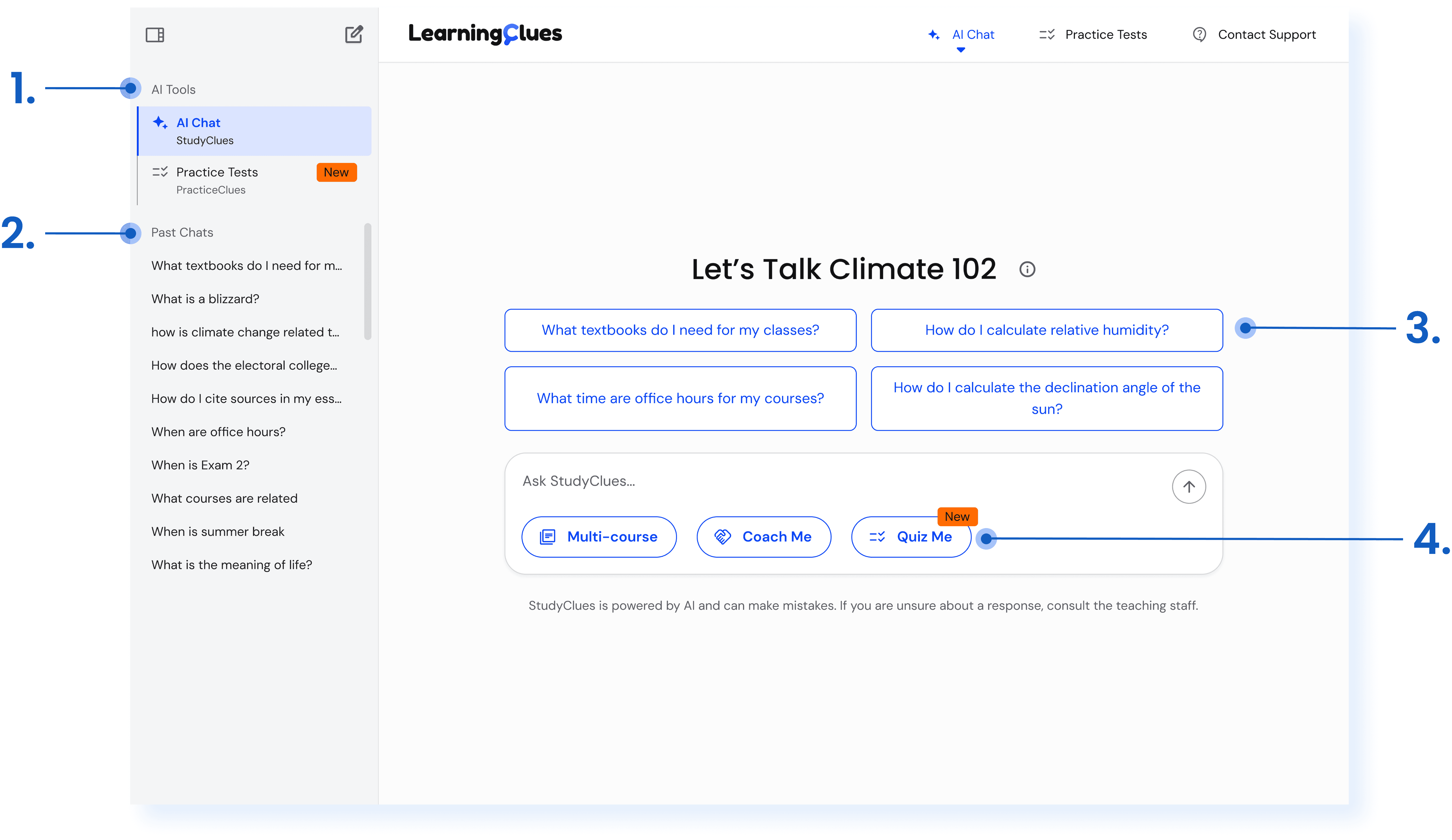
A welcoming and usable chat interface that surfaces new AI features clearly and helps students navigate the system with ease?
Redesigned AI Chat
THE PRODUCT
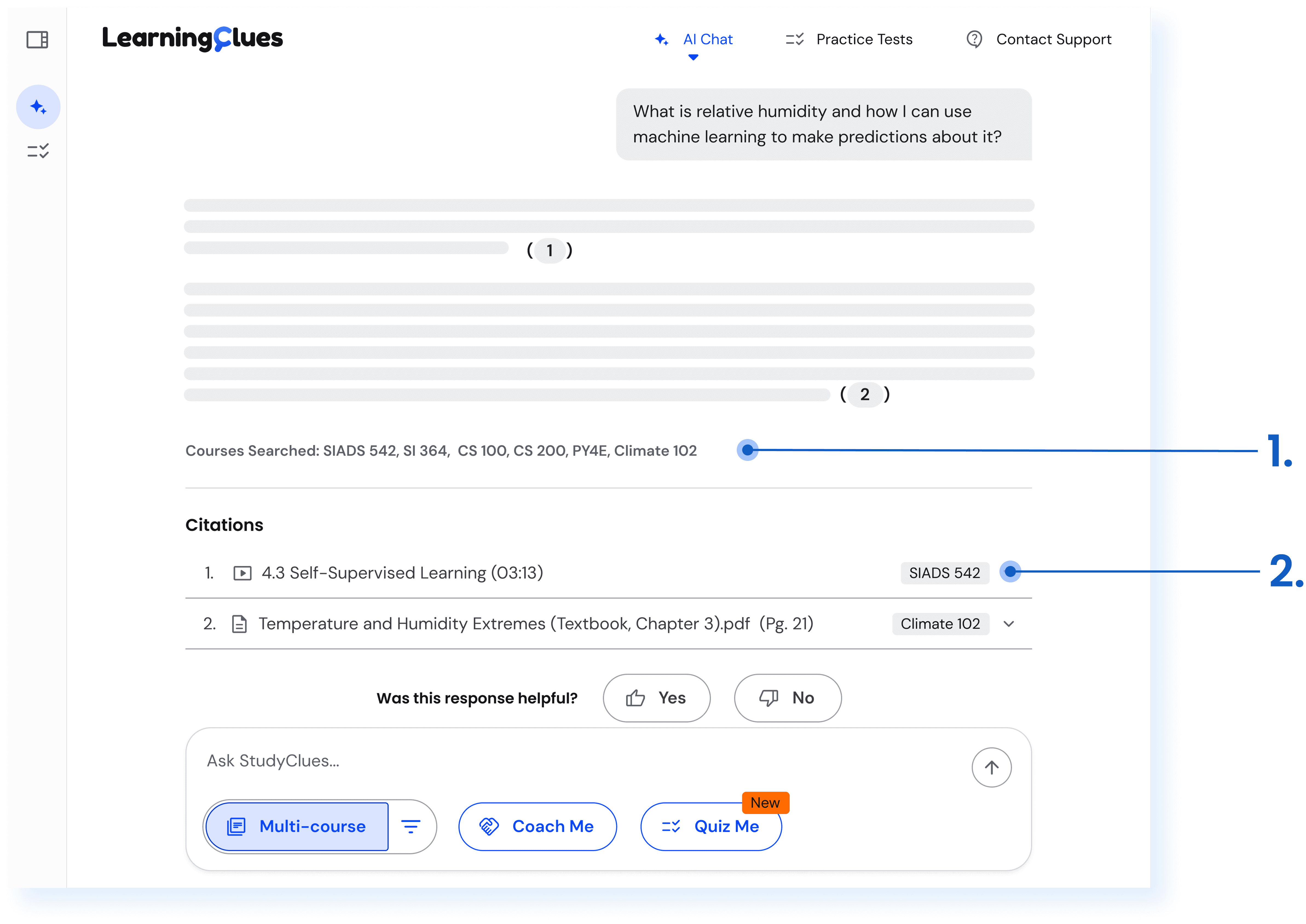
StudyClues AI Chat responses are grounded in course materials with citations to exact lecture moments and sections in documents used to generate them.
StudyClues Demo
WHY REDESIGN?
3 Issues Converged…
New AI Features have no UX Home
The engineering team is actively building three new AI capabilities that need clear entry points.
Discoverability Issues
Popular questions are failing to attract user attention.
A sister product for generating practice tests is getting low engagement despite needs expressed by end-users.
The interface is outdated
The interface does not represent the evolving LearningClues design system and brand identity.
Typical chat features like a conversation history panel is missing.
WORKING AROUND CONSTRAINTS
Designing for Moving Targets
No Formal User Research Budget
Accessibility is Non-Negotiable: A Throughline
DESIGN DECISIONS
Treating AI capabilities as visible modes, not hidden features
What I Did
I surfaced the three new AI modes as persistent action chips directly below the chat input field. New modes are launched with a "New" badge to draw attention.

Why I Did it that Way
While studying competitors like ChatGPT and Claude in incognito mode, I noticed something interesting.


For long-time users, AI modes like deep research were tucked behind a dropdown.

For new users, the same modes appeared more prominently in the chat input.
Products in their growth stage require visibility; mature products optimize for power users.
StudyClues is in its growth stage. Students don't yet know what it can do. Hiding capabilities behind menus would have been the wrong call. Visible chips meant students could see the system's range without being told.
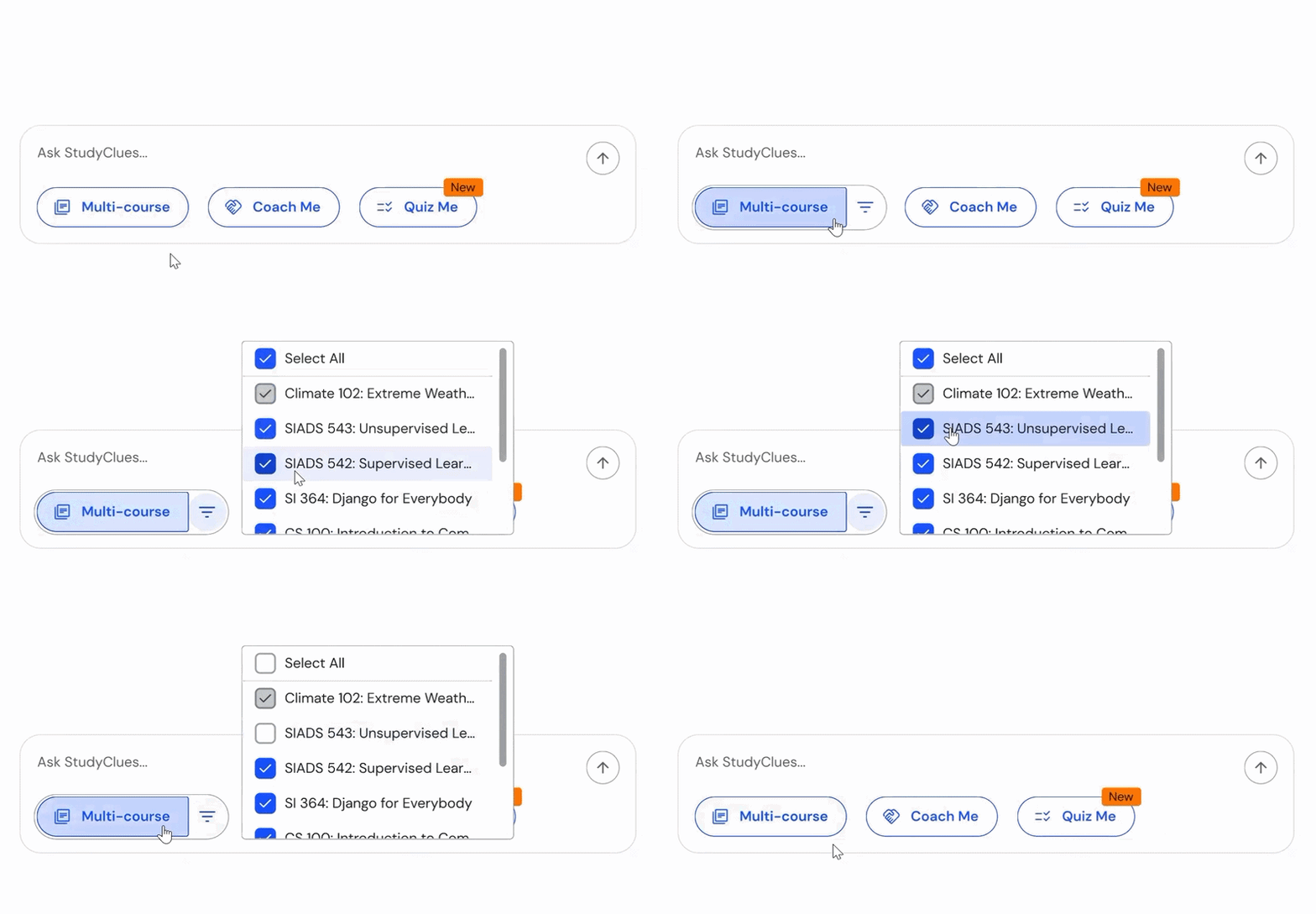
Each Mode Received its Own Contextual Treatment
Fixing first-touch friction with onboarding and contextual prompts
What I Did
I redesigned the very first thing a student sees when they open StudyClues, in two parts:
Part 1: A 4-step onboarding flow
This runs the first time a student lands on the platform. Step 1 explicitly addresses anonymity. The remaining steps walk through how to use the system. Students can skip, but a visible progress bar communicates that the tutorial is short.
Why I Did it that Way
The onboarding step was driven by customer success feedback. Some client institutions reported that students were hesitant to ask questions because they thought instructors could see who asked what. The welcome message had always said this, but most students didn't read it. Putting anonymity as a headline text in step one of a tutorial flow, was a more reliable way to make it land.
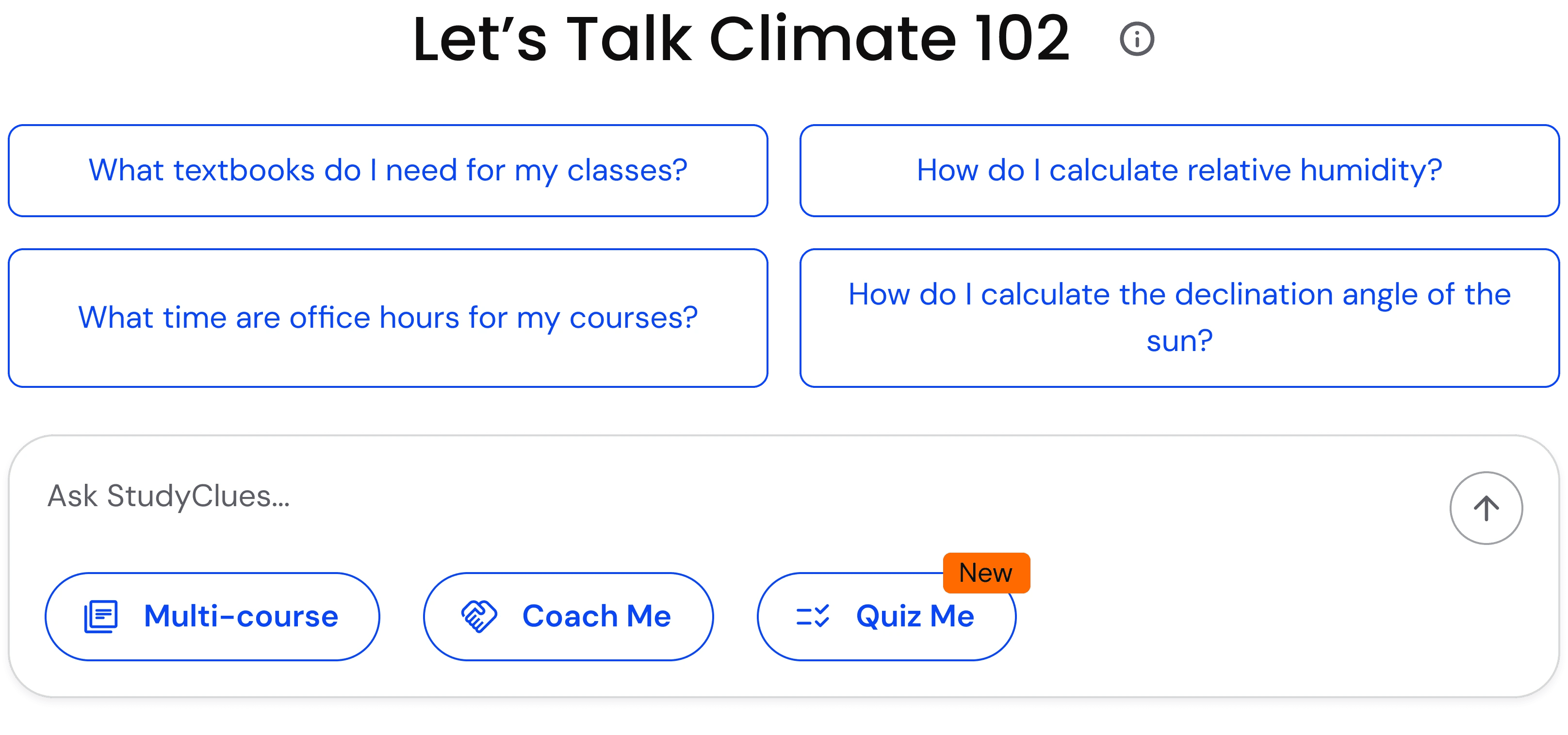
Part 2: Surfacing Popular Questions Upfront
Why I Did it that Way
This decision came from PostHog data. The original design hid the four most-common student questions behind an overlay, and almost no one opened it. I first tried making the overlay trigger more prominent using a better border, brighter color. Sadly, it did not make much difference and I learnt why :/
The fix wasn't a better button. It was removing the overlay entirely. Students wanted to see suggestions immediately, not click to find them. So I redesigned them as inline bubbles that appear at the start of a fresh conversation and disappear after the first message is sent.
What was the Result
The cleaner landing state was called out positively in client institution feedback and PostHog data started showing students actually engaging with popular questions. Customer success reported that students seemed more confident in using StudyClues' capabilities after onboarding launched.
What I Learnt
No one reads the fine print. If something is critical for users to know — like anonymity, in this case — it has to be made unmissable. A welcome message is not enough.
Embedding a sister product to drive cross-product adoption
What I Did
I introduced "Quiz Me" as a mode within StudyClues that ports PracticeClues' core experience directly into the chat. PracticeClues is a sister product of LearningClues that uses AI to generate practice tests from course content.
Part 1: Practice Test In-Chat Embed
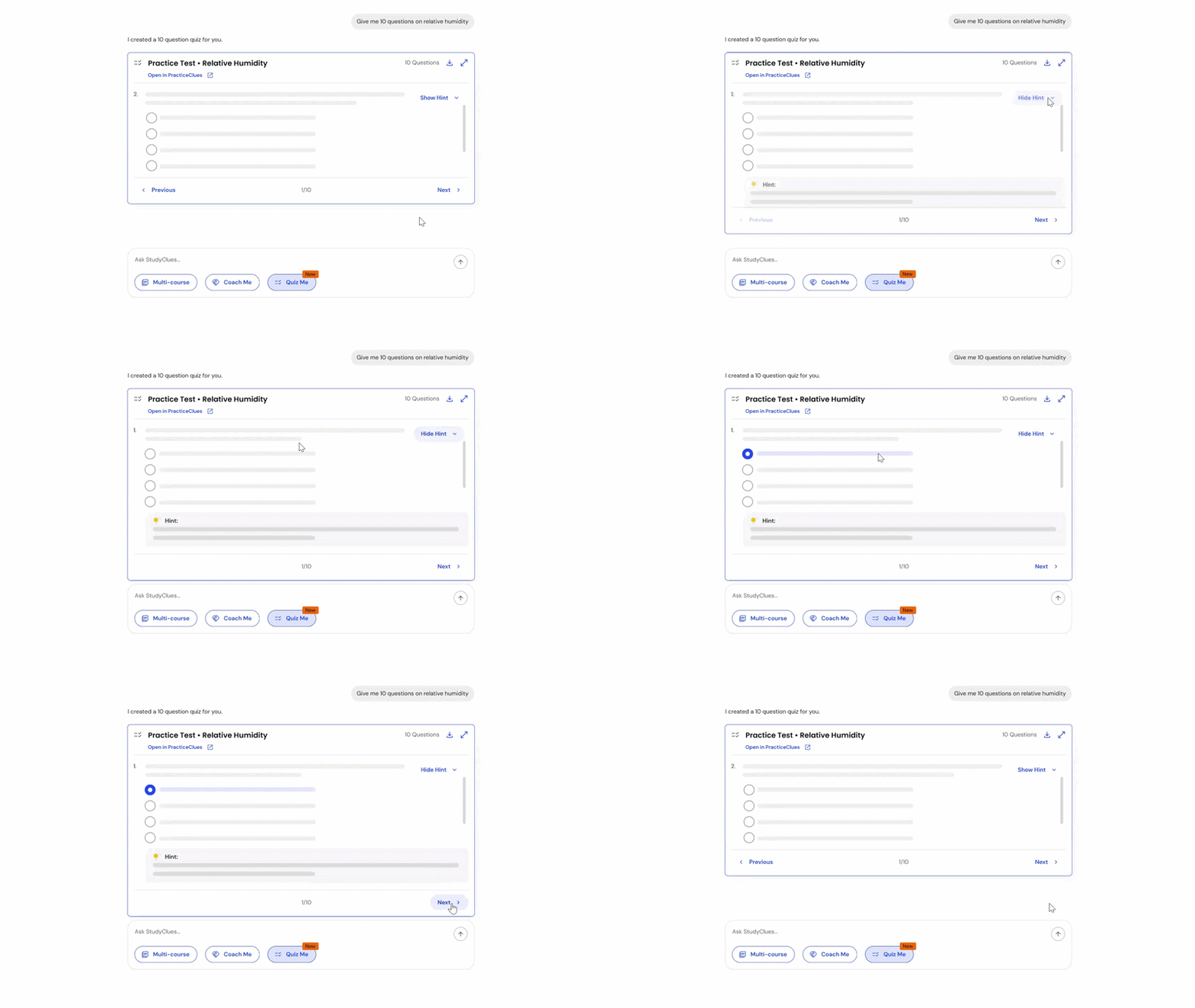
When a student selects the "Quiz Me" mode, the AI follows up to ask what topic they want to be quizzed on and how many questions they want. Once confirmed, it generates an interactive practice test that appears as an in-chat embed.
Why I Did it that Way
PracticeClues had low standalone usage even after two earlier interventions: I listed it in the left sidebar above conversation history (modeled on ChatGPT's model list), then renamed it from "PracticeClues" to "Practice Tests" in the top navbar to reduce platform-name friction. Both helped, but usage stayed below target.
PostHog data showed that students were already asking StudyClues for practice questions in chat. The need was there but the functionality was missing. Hence, it made sense to embed it inside the workflow students were already using.
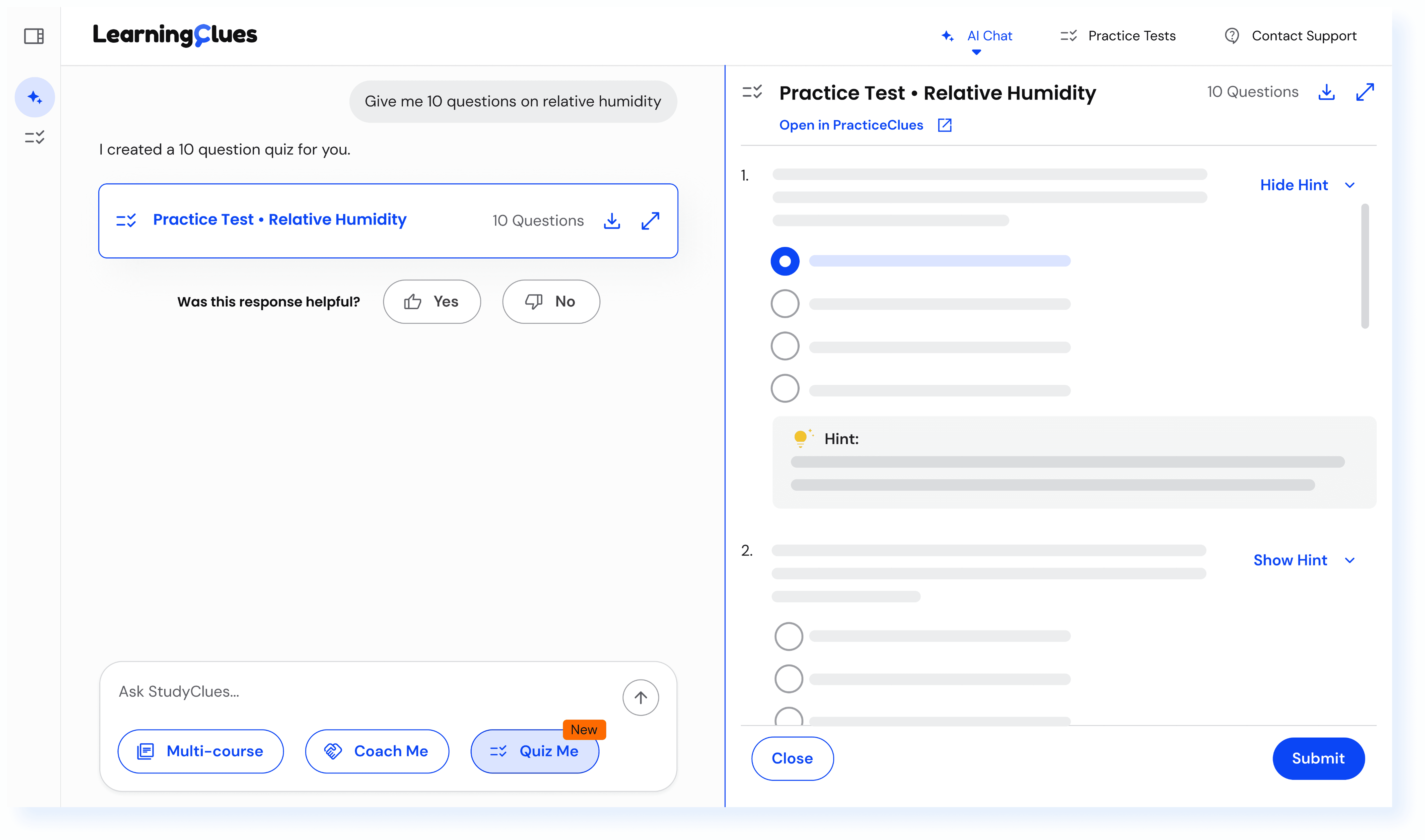
Part 2: Resizable Side Panel View
The practice test embed can be expanded into a side panel for a more focused, full-screen view.
Why I Did it that Way
When the sidepanel opens, the conversation history and left sidebar collapse, which gives students a focused, less cluttered space to work through the test. This was particularly important for neurodivergent students who'd shared in feedback that visual clutter made it harder to concentrate. Students who wanted to keep the chat visible could stay in the inline embed.
What was the Result
Qualitative feedback from students has been positive. They appreciated being able to take a quiz in the same conversation where they'd been asking questions, rather than context-switching to a separate platform. PracticeClues has seen an 18% increase in usage, but we're still evaluating PostHog data to confirm a direct causal relationship.
What I Learnt
Sometimes the best way to grow a product isn't to fight for its standalone visibility. It's to embed it inside a workflow that's already working.
BALANCING USER NEEDS WITH BUSINESS CONSTRAINTS
Not everything in a redesign makes it to production and learning when to let go is part of the work.
Students consistently asked for a web search mode for the ability to search beyond their course content. I designed the full flow, but it was cut for cost reasons since expanded retrieval would have been unsustainable on our existing OpenAI API spend. If I'd had more time, I would have pushed for an A/B test to model whether usage justified the cost. Sometimes business constraints trump user requests, and part of the work is recognizing when.
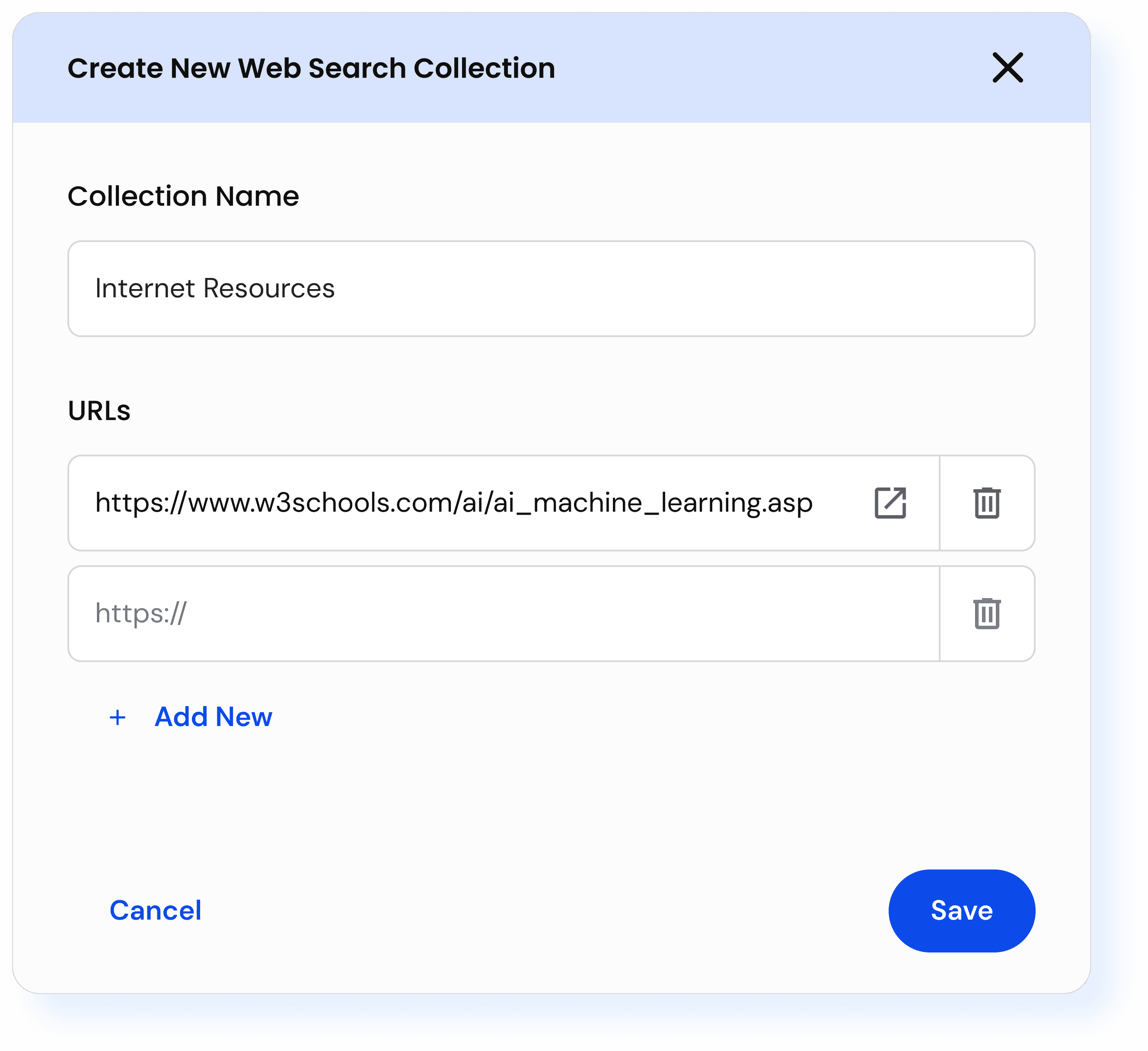
An overlay to allow students to create web URL collections within StudyClues for targeted web search, excluded from production due to high LLM costs associated with internet search
RESPONSIVENESS & ACCESSIBILITY
Throughout the redesign, every screen was validated against WCAG 2.2 AA standards using the Stark plugin in Figma ensuring color contrast, focus states, touch targets. Manual testing included keyboard navigation checks. Automated testing was done using Wave and aXeDev Tools used on deployed builds.
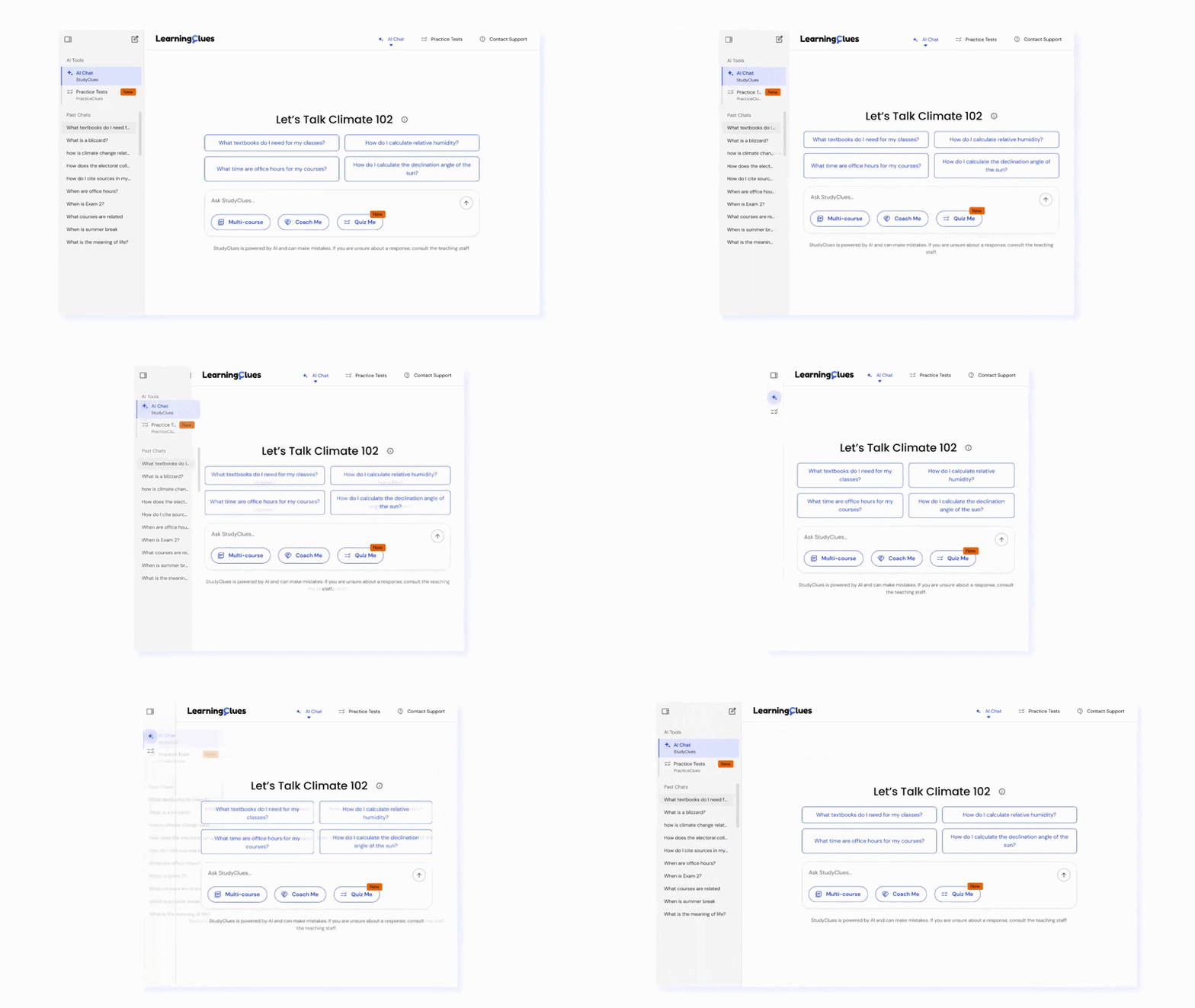
Designed responsively across three breakpoints (1440px, 1024px, and 768px)…
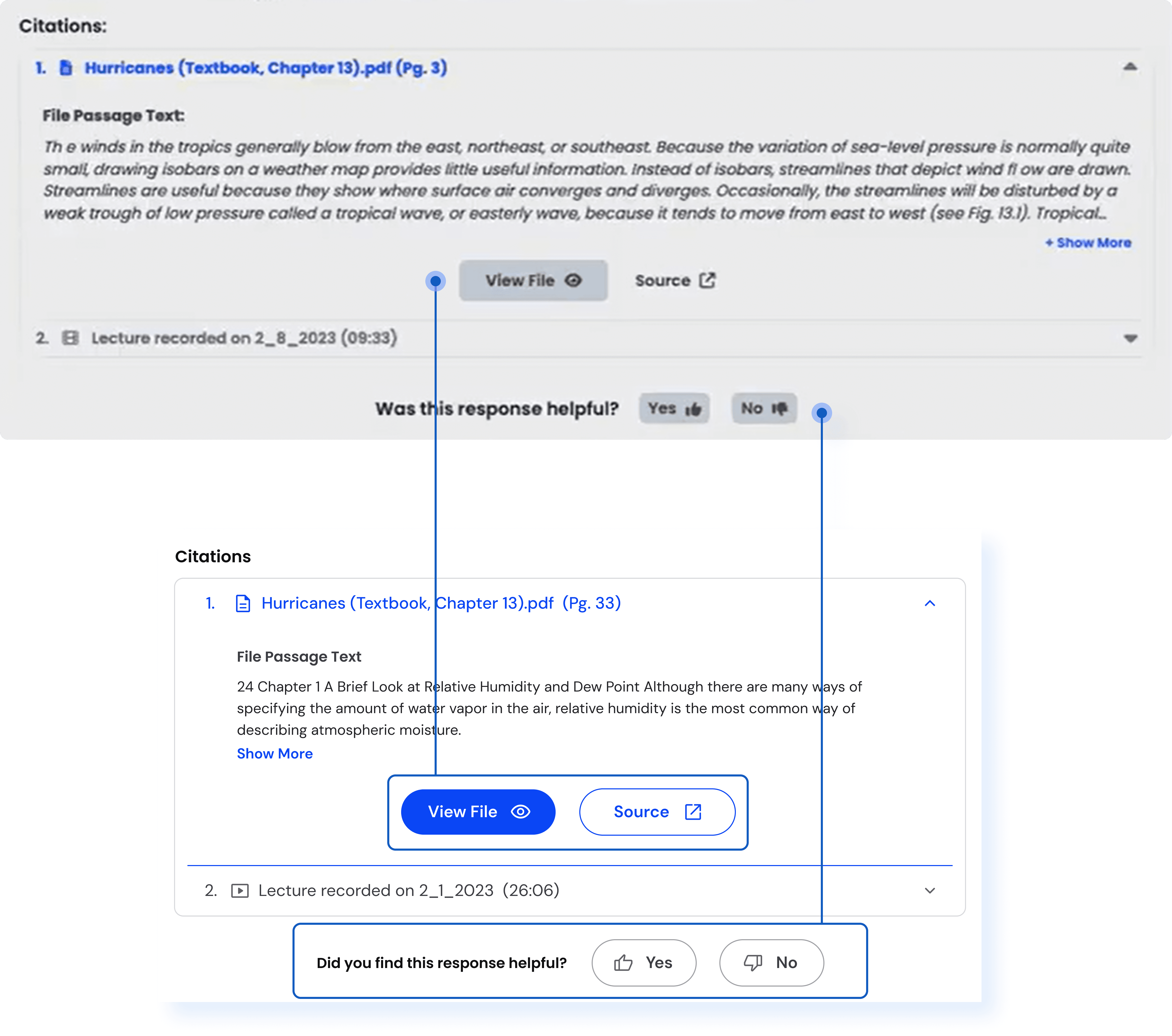
FINAL DESIGNS
StudyClues, Redesigned…

AI Chat Landing Page

Multi-course Mode Search

Interactive Quiz Embed
OUTCOMES
From 0 → 4 clients, increasing user adoption and retention…
Increased Student Reach
17,000+ students across 250+ courses at R1 institutions including UC Berkeley and UW–Madison.
Increased Student Retention
Students noted that the new interface felt clean and easy to navigate with an average retention rate of 57%, peaking at 77%.
Cross-Product Lift
Early signals suggest the Quiz Me embed has increased PracticeClues engagement. Full PostHog analysis is in progress.
Endorsement from Leadership
She's proactive about identifying problems rather than waiting for direction. One examples is the StudyClues redesign where she took the product from a basic chat interface […] to a full-featured UI with conversation history, a complex and space-efficient layout for advanced features like quizzing, and accessibility standard considerations." Read More
— Achintya Kattemalavadi, Lead Software Engineer, LearningClues
Memuna is a gifted UX/UI designer whose work has had a direct and lasting impact on our company. She has a rare ability to create interfaces that are not only visually compelling, but intuitive, elegant, and grounded in user needs." Read More
— Perry Samson, CEO, LearningClues
REFLECTIONS
What I Learnt
Designing for AI is designing for trust and agency
As models get more capable, the harder problem is helping users build an accurate mental model of what the system can do, and making sure they always feel in control of the interaction.
AI products should also be agentic. The system should offer its own capabilities rather than wait to be asked.
When research isn't possible, competitors are
When user research isn't possible, competitor products become a research substitute. ChatGPT, Claude, and Gemini represent millions of hours of design decisions that students were already conditioned to.
Proactively asking for feedback also matters. Working solo doesn't have to mean alone.
What I would do Differently
More Evaluative Research
We often moved on to building the next feature without first evaluating whether the previous one was actually working. With more time, I would have pushed harder for usability testing rounds between launches.
Push earlier for data access
Several decisions in this redesign were initially based on intuition and competitor patterns, then later confirmed by PostHog data. Having that data earlier would have let me move faster on the right things and avoid investing in the wrong ones.
Thanks for sticking till the end! :)